Mega888 APK HubMega888 APK and iOS download, with the file facts

Download Mega888 APK for Android (v1.2)

Mega888 app icon

Mega888 v1.2

75.5 MB ยท Android 4.4+

Checked 23 Nov 2026
Version
1.2 (version code 1)
File
Mega888_V1.2.apk
Size
75.5 MB (75,501,225 bytes)
Package
com.mega888.Release
Needs
Android 4.4 or newer
Signed by
Original signing key, valid 24 Apr 2021 to 18 Apr 2046
Key fingerprint
A3:05:62:44:CA:4A:44:85:D0:65:9E:E5:32:FD:73:CA:53:51:1D:6C:24:FC:08:57:7F:D9:47:35:60:8E:7A:5F
SHA-256
e7d6a83332330e0a241fef5bf215bdc0bd071b8663d3d8fc4ea0bf6b36849367
Checked
23 Nov 2026

This Mega888 v1.2 APK download is the latest version for Android, checked against the original signing key before we list it. It installs on Android 4.4 and newer, including Android 14, and the steps below take you from download to login, with the warnings and fixes you might meet on the way.

Mega888 Android Requirements: Android 4.4 and Up

Android version4.4 (KitKat) or newer. The file's minimum SDK is 19, although some listings say 5.0.
Built forAndroid 10 (target SDK 29). Newer versions install it as well.
Free spaceAbout 76 MB for the download, plus room for the installed app
Phone brandsOne file for every Android phone, including Samsung, Xiaomi, Oppo and Vivo

An APK won't run on an iPhone. If that's your phone, get Mega888 iOS for iPhone users instead, which installs through Safari.

How to Install Mega888 APK on Android

Cara download Mega888 on Android takes one download and two settings screens. The labels below are from standard Android; other brands use similar wording in slightly different places.

Allow Your Browser to Install Unknown Apps

  1. Tap Download Mega888 APK above and wait for the download to finish.
  2. Tap Open. Android says your browser isn't allowed to install apps.
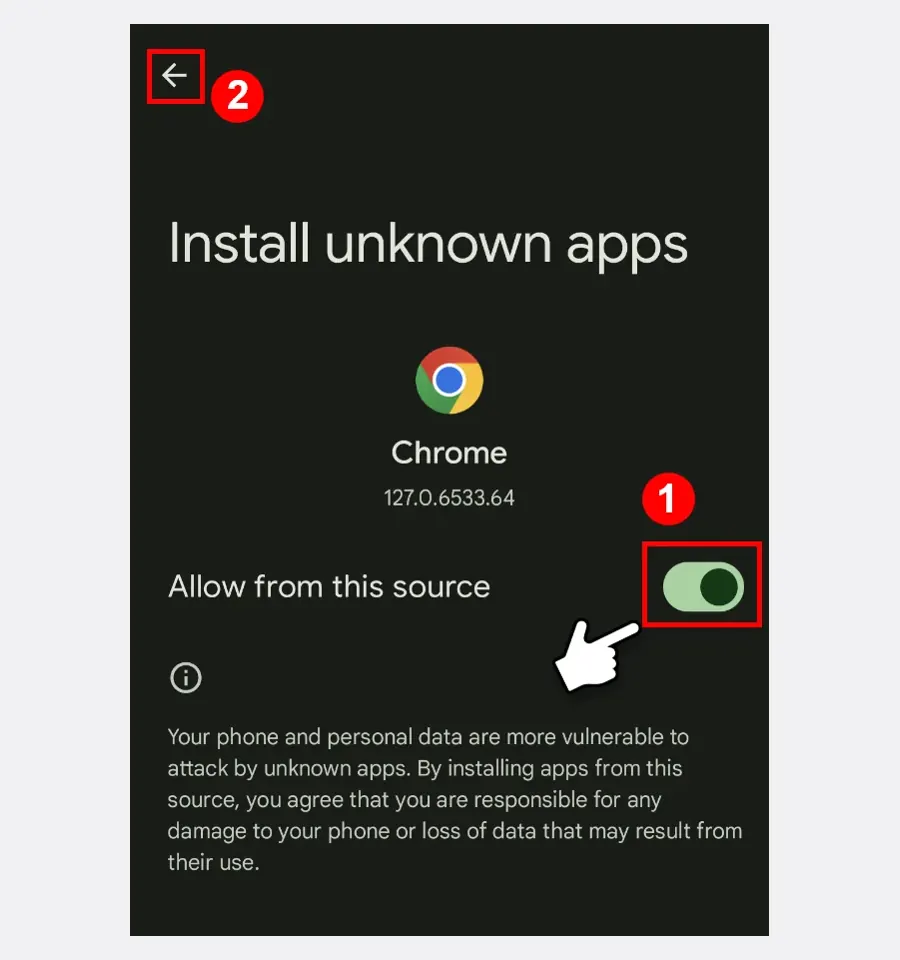
  3. Tap Settings, turn on Allow from this source, then go back.

On Android 7 and older, the setting is called Unknown sources, under Settings, then Security.

Android Install unknown apps screen with Allow from this source turned on

The 'File Might Be Harmful' Warning

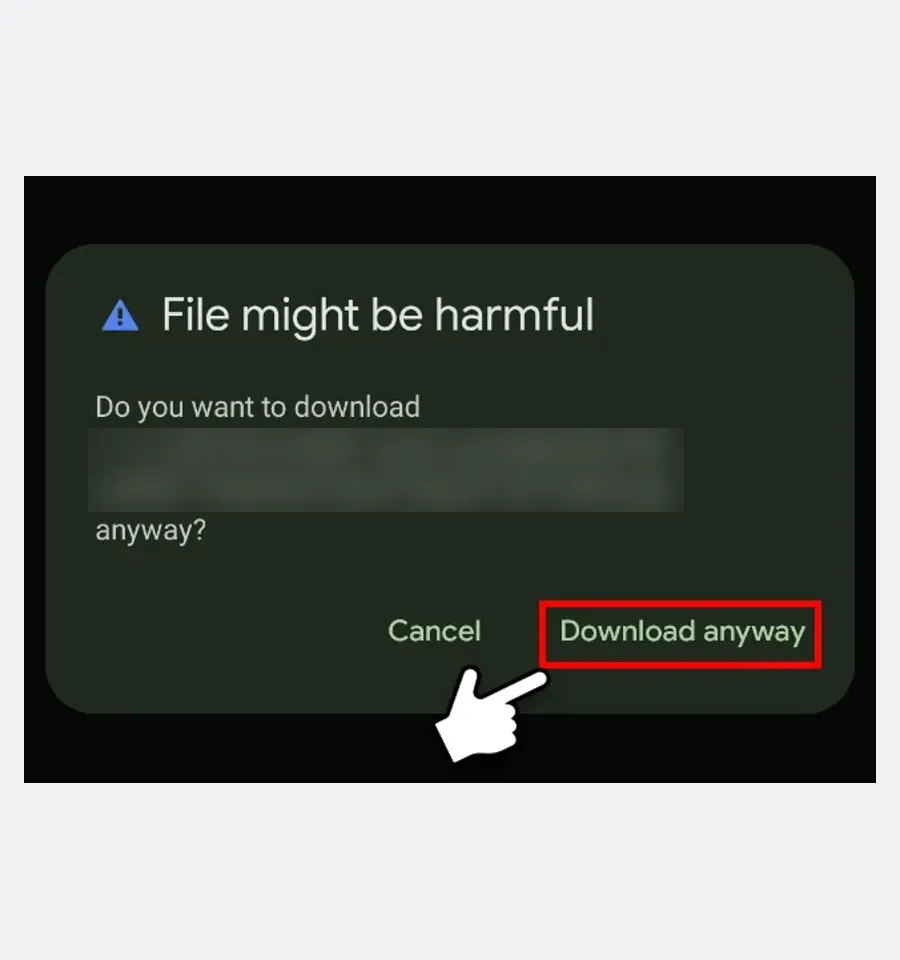
Chrome may warn that this type of file can harm your device. It shows this for every APK downloaded outside Google Play, so the warning alone doesn't mean the file is bad, or good. Tap Download anyway only once you've confirmed the size is 75.5 MB. If Google Play Protect steps in too, the fixes below cover it.

Chrome warning that a file might be harmful, with Download anyway highlighted

Open the App and Log In

Once installed, the app appears in your app drawer. Open it and you'll see the login screen. Your ID comes from an agent, and this explains how to log in to Mega888 after you install, including test IDs.

Mega888 APK Download on Android 14 and Newer

Android 14 blocks apps built for very old Android versions, below Android 6. This APK targets Android 10, so Android 14 and 15 install it normally. If Android 14 still refuses, the fixes at the end of this page cover the usual causes.

Check the Mega888 APK Before You Open It

Three checks, from quickest to strongest:

  • Size: 75.5 MB is a good sign, but not proof. A very different size means a different file.
  • Signing key: an original Mega888 APK is signed with the key on the card.
  • Fingerprint: the SHA-256 must match the card character for character.

You can check the Mega888 APK before you open it on your phone, and it runs the last two checks for you.

Someone may send you a file labelled v1.0. Before installing it, read Mega888 v1.0 vs v1.2 for Android to see what that label usually means.

Mega888 APK Permissions: What the App Asks For

The file's manifest lists 39 permissions, and Android treats them in three ways:

TypePermissionsWhat Android does
Asks you firstSMS (read and send), contacts, phone state and number, location, camera, storageShows a prompt, and you can say no
Granted without askingInternet, network and Wi-Fi state, vibration, NFC, requests to install appsAllows them when the app installs
System-onlyInstalling or deleting apps, reading system logs, the status bar and othersNever grants them to a downloaded app

If you'd rather not share SMS, contacts or location, deny those prompts. We haven't tested which features stop working without them. We read this list straight from the file, and this is how we checked this APK.

Mega888 APK Won't Install? Common Fixes

What you seeLikely causeWhat to do
"App not installed"An older build with a different signature is on the phoneUninstall it, then install this file
"There was a problem parsing the package"The download stopped earlyDelete the file and download it again over Wi-Fi
"Blocked by Play Protect"Play Protect doesn't know the developerTap More details, then Install anyway, once the file has passed our file check
Not enough storageThe phone is nearly fullFree some space and try again
The Install button does nothingA screen filter or chat bubble app sits on topClose it and tap Install again

The download cards for both Mega888 files for Android and iOS always show the latest file we've checked.

Still can't install? Send your agent a screenshot of the error.

Frequently Asked Questions

Will Google Play update the app for me?

No. Google Play doesn't update apps installed from a file. Download each new build here.

Can I delete the APK file after installing?

Yes. Once the app is installed, the file isn't needed. Deleting it frees 75.5 MB.

Can I install the APK on two Android phones?

Yes. The same APK installs on each phone. Log in with your own ID.

Does the app need internet to play?

Yes. It requests internet access and needs a connection to load the games.

Which browser should I use to download the APK?

Chrome works on most phones. Samsung Internet and Firefox can download the file as well.