iPhone installs only work in Safari. Copy this page link and open it in Safari.
Your Mega888 iOS download installs through Safari with a developer profile, because the app isn't in the App Store. It takes one extra step in Settings compared with a normal app, and the same file works whether your iPhone runs iOS 15, 16, 17 or 18.
Mega888 iOS Requirements: iOS 9.0 and a 64-bit iPhone
iOS version
9.0 or newer
iPhone model
Any model with a 64-bit chip: iPhone 5s or later
Screen
Landscape only
Permissions
Photos and notifications. You can decline either one.
The install has three parts. Do them in order, and keep this page open in Safari while you switch to Settings.
Install the Profile from Safari
Open this page in Safari, not Chrome or the browser inside a chat app.
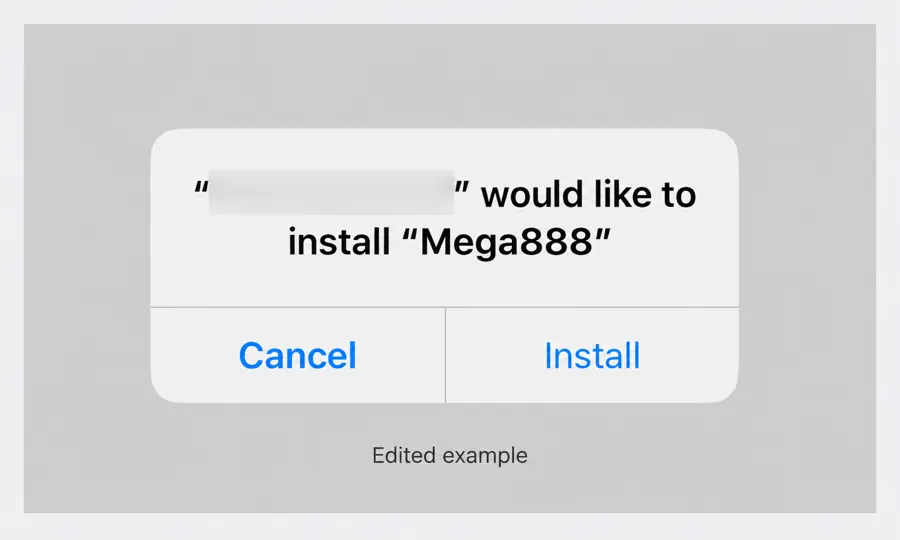
Tap Install on iPhone, then tap Install again when iOS asks.
Go to your Home Screen and wait for the icon to finish loading.
1
Trust the Developer in VPN & Device Management
Opening the app now shows "Untrusted Enterprise Developer". That is expected.
Go to Settings, then General, then VPN & Device Management.
Tap the developer name under Enterprise App, then tap Trust.
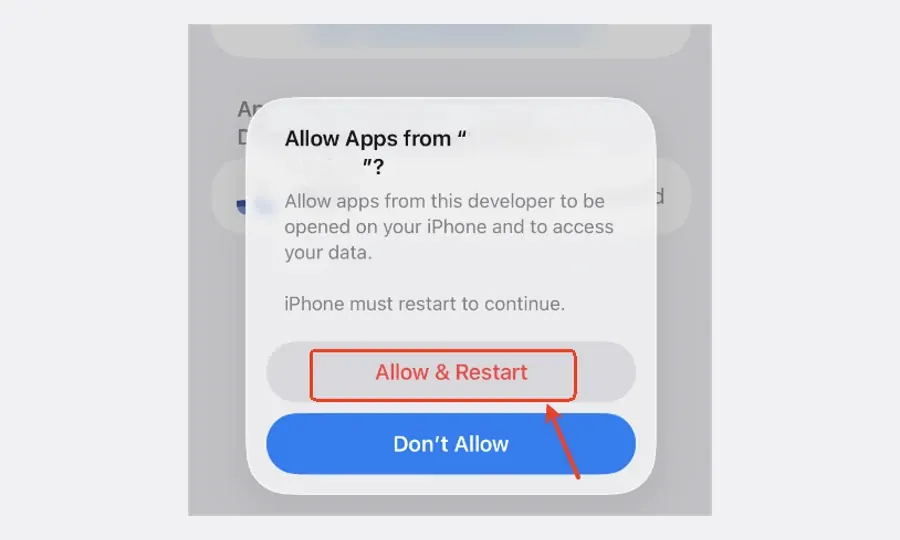
On newer iOS versions, a prompt asks you to allow apps from this developer. Tap Allow & Restart, and your iPhone restarts before the app opens.
2
Open the App in Landscape
Tap the icon again and turn your iPhone sideways, because the game only runs in landscape. Then log in with your own ID. Here is where IDs come from and how Mega888 login on iPhone works.
Mega888 iOS 15.1, 16, 17 and 18 Download Notes
Got a link labelled for one iOS version, such as 15.1 or 15.3.1? There is no separate file for each version. The same file covers them all, and only the name of the Trust menu changes:
Your iOS version
Same file?
Where the Trust step is
iOS 15 and newer (15.1, 15.3.1, 16, 17, 18)
Yes
Settings > General > VPN & Device Management
iOS 9 to 14
Yes
Settings > General > Profiles & Device Management, or Device Management on the oldest versions
If someone offers an "iOS 15.1 version" of the app, it is either this file under another name or a different app. The number in a file's name isn't the app's version, and Mega888 version numbers explained shows where the labels you'll see come from.
Mega888 Original Download for iOS: What to Check
Looking for a Mega888 original download for iOS, or a Mega888 APK for iOS? iPhones can't install APK files: the iOS file is an IPA, and it installs only through a profile link. You can't open an IPA on an iPhone to read its details, so check these instead:
The link came from this page or from your agent, not from a group post.
Settings, then General, then iPhone Storage shows the app at about 68 MB plus its data.
The developer name in VPN & Device Management stays the same when you reinstall. If it changes, ask your agent why before you trust it.
Inside the file, the app reports version 1.0.0, while its release name is 1.2. Both numbers belong to the same file we checked, which carries the bundle ID com.mega888.Release. We read those details from the file itself, and this is how we checked the iOS file.
The Android card sits next to this one on our list of all Mega888 download files, each with its own check date.
"Unable to Install" on Mega888 iOS: What It Means
What you see
What it means
What to do
"Unable to Install"
The developer certificate behind the build has expired or been revoked
Ask your agent for the current iOS link
"Untrusted Enterprise Developer"
You haven't trusted the developer yet
Do the Trust step above
The app closes as soon as it opens
Often the same certificate problem
Ask your agent for the current link, then trust it again
Apple controls these certificates, so this can happen to any app installed outside the App Store. Builds shared this way need a renewed certificate from time to time, and the install link changes when that happens.
Still seeing "Unable to Install"? Ask your agent for a working link.